After you complete a workout, TrainerRoad asks one quick question: How did this effort feel? Your answer gives TrainerRoad AI qualitative feedback that power data alone can't capture, and it's one of the things that helps your training adapt to you. When you tell us how a workout went, and why, TrainerRoad AI can account for it instead of guessing.
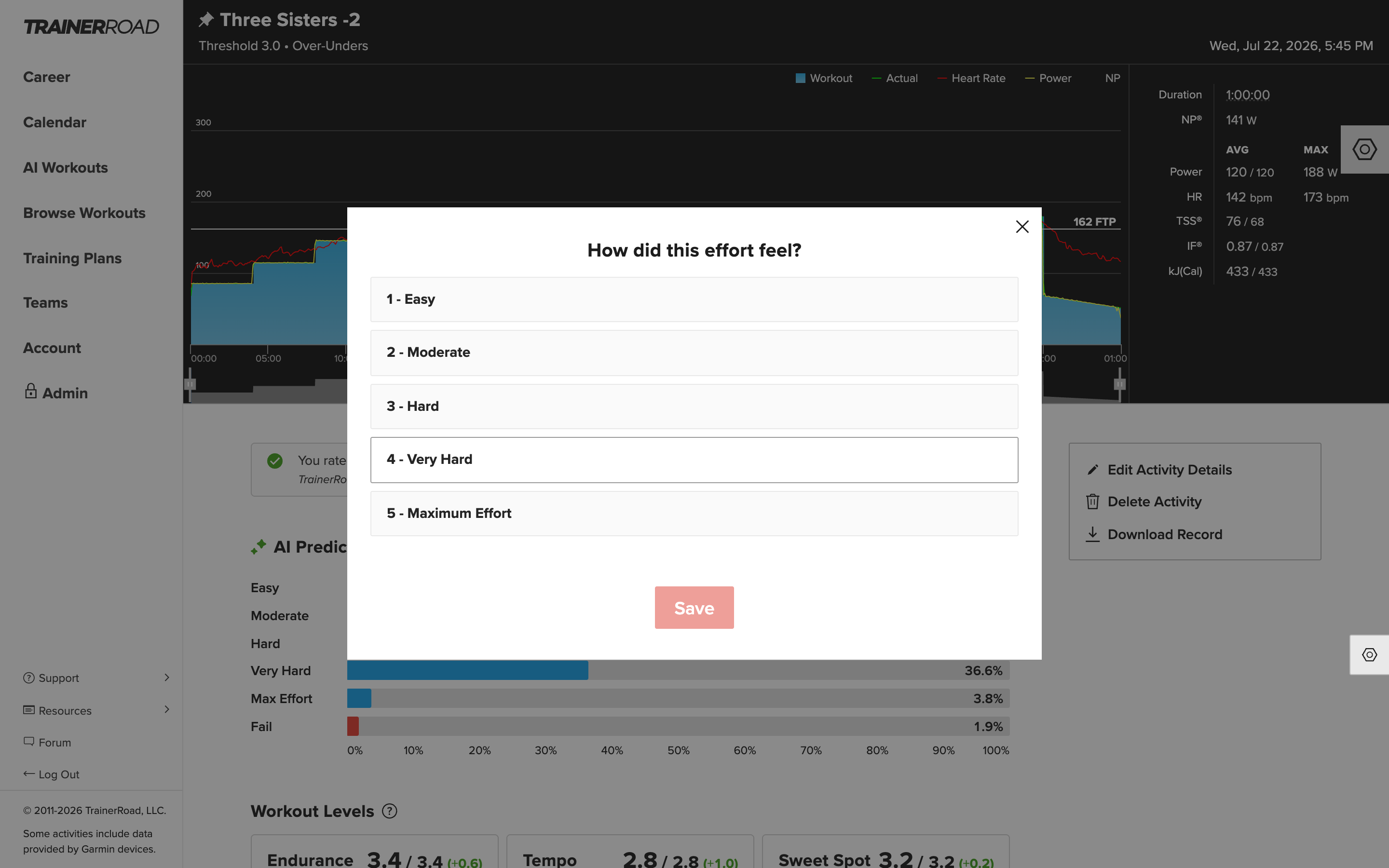
Surveys only take a few seconds. If you skip one, complete a workout offline, or ride outside, you can still add your response later. You have up to 7 days after the activity to edit a response or add one in.
How Should I Answer Surveys?
When it comes to surveys our biggest piece of advice is to not overthink it. Rate the overall difficulty of the entire ride, not how you expected it to feel, and not the single hardest interval. There are no right or wrong answers, and answering honestly matters more than answering "correctly." I
f you catch yourself tempted to answer differently to sway your future workouts or your FTP, that's a sign you might be overthinking it or giving TrainerRoad the wrong data. We also recommend answering right after the workout while the effort is fresh in your mind.
How to Rate Your Effort
- 1 - Easy
This ride felt easy and non-taxing, requiring little effort or focus. You could repeat the ride and pass it without issue. - 2 - Moderate
This ride was somewhat comfortable but required some focus to complete. You felt a little challenged but had confidence that you could finish. If the ride had an additional set of intervals, you could complete it. - 3 - Hard
This ride required effort and focus and was challenging to complete. It felt tough, and you looked forward to the ride ending. If there were an additional set of intervals, you could have done it with significant focus. - 4 - Very Hard
This ride was very difficult to complete, and it tested you. If there were one more set of intervals, you wouldn't have been able to complete it. - 5 - Maximum Effort
This ride was extremely difficult. It pushed you well beyond your abilities and took a massive amount of energy and focus to complete. You felt like you barely made it to the end of this ride, and that you had to pull out every mental trick in the book to finish. If you had to pause during a workout to catch your breath or adjust the power demand down, the workout was likely a maximum effort.- If a workout was a maximum effort because of external factors like illness, poor sleep, or fatigue, be sure to add that detail in the follow-up question.
Follow-Up Questions
Some workouts get a second question. TrainerRoad AI analyzes your ride data to decide which survey you see. If it looks like you struggled, didn't hit the workout's power targets, or ended the workout early, it asks why, and your response can confirm or correct what it detected.
- If the workout looked like you struggled to finish, you'll be asked for the primary reason today's ride was challenging.
- If you didn't hit the workout's power targets, you'll be asked what kept you from hitting them.
- If you ended the workout early, you'll be asked what best explains why you cut it short.
Depending on the situation, the reasons you can choose from include:
- Time ConstraintIntensity
- Too Easy
- Fatigued
- Under-fueled,
- Poor Sleep
- Stressed/Unmotivated
- Sick
- Injured, Equipment Issue
- Heat
- Menstrual Cycle
- Other: with room to add your own note when none of the options fit.
Pick the option that had the biggest impact on your workout. How TrainerRoad AI weighs a tough day depends on the reason: struggling because of poor sleep or under-fueling is not the same as struggling because the workout itself was too intense and a workout you cut short because you were overheating is not the same as one you cut short because you've lost fitness.
If TrainerRoad AI got it wrong, say so. That's what "I didn't struggle with this workout" is for. And on outside workouts, where power data can't tell the whole story, you'll also see "I Did Not Pass" for rides that didn't go as prescribed, regardless of why. (You won't see "I Did Not Pass" on indoor workouts — indoors, TrainerRoad AI reads your power data directly and serves the right survey automatically.)
Surveys for Outside Rides, Races, and Zwift
Surveys aren't just for indoor workouts, you'll be asked how every ride felt, including unstructured outside rides and races. Those responses are a really important part of analyzing your fitness, especially if outside riding makes up a big share of your volume.
- Outside workouts: If your ride was matched to a structured TrainerRoad workout, rate the structured portion of the ride, not the extra volume you added before or after it. And rate what you actually did: if you pushed above the targets until the effort felt hard, answer "Hard," even if the workout as originally prescribed would have felt easy.
- Unstructured rides and races: just rate how the ride felt overall. An all-out race that felt brutally hard simply because racing is intense isn't a red flag about your fitness. If you get a follow-up question, "Intensity" is usually the right reason to pick.
- Zwift: you'll answer the effort survey right in Zwift when you finish a TrainerRoad workout there. If TrainerRoad AI needs the struggle follow-up, you'll complete that part in the TrainerRoad app afterward.
How to Add or Change an RPE Response
If a survey wasn't completed right away, whether it was skipped, or the workout was completed offline or outside you can still add a response for up to 7 days after the activity. You can change an existing response in the same places:
Web
Step One: Open the ride from your Calendar or Activity List.
Step Two: If a response is missing, you'll see a banner asking "How difficult was this workout?" Click this banner
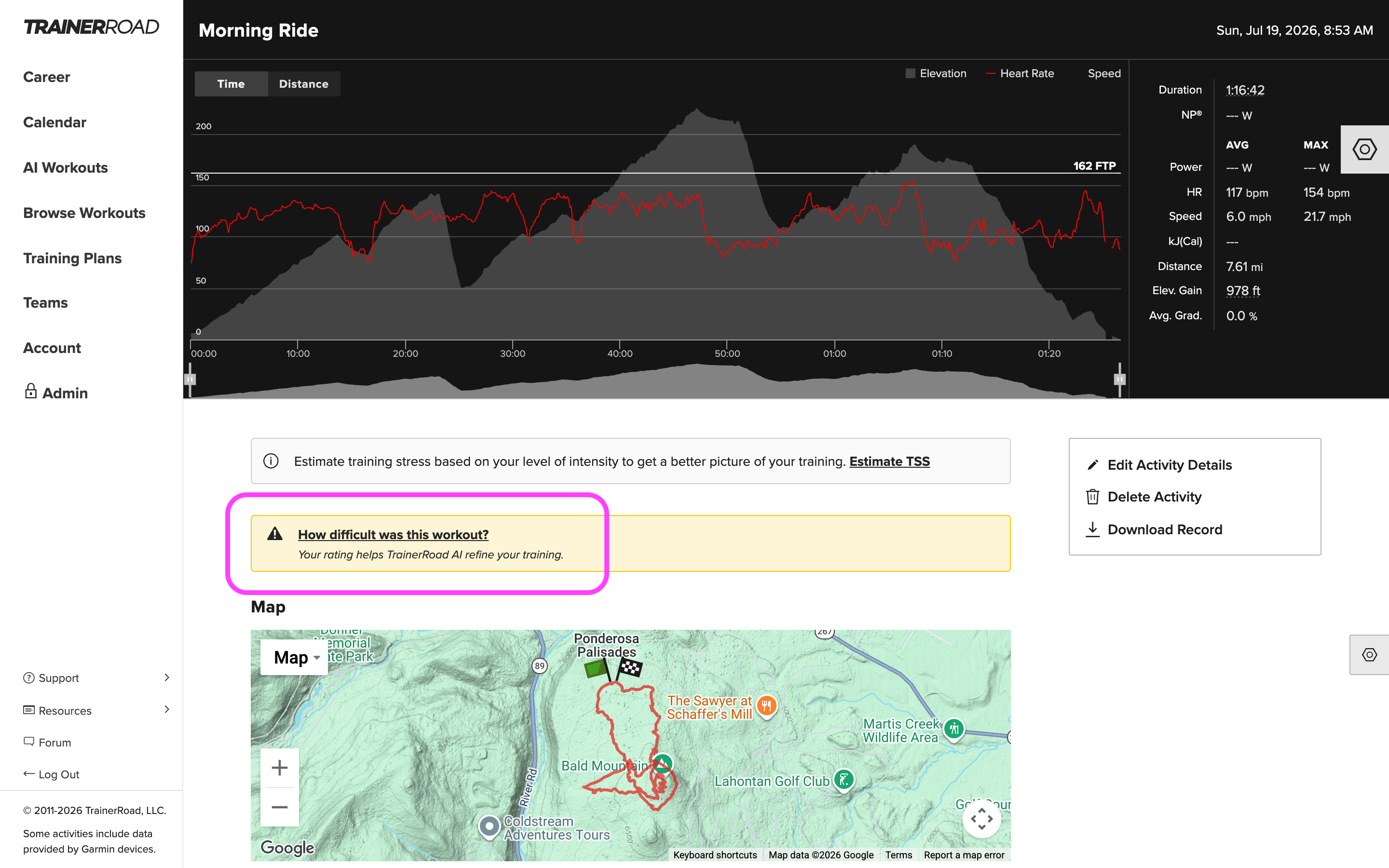
Step Three: Pick your rating, and hit Save.
If you already responded, click your rating in the "You rated this workout as:" banner. From there you can select a new rating and select Save.
App
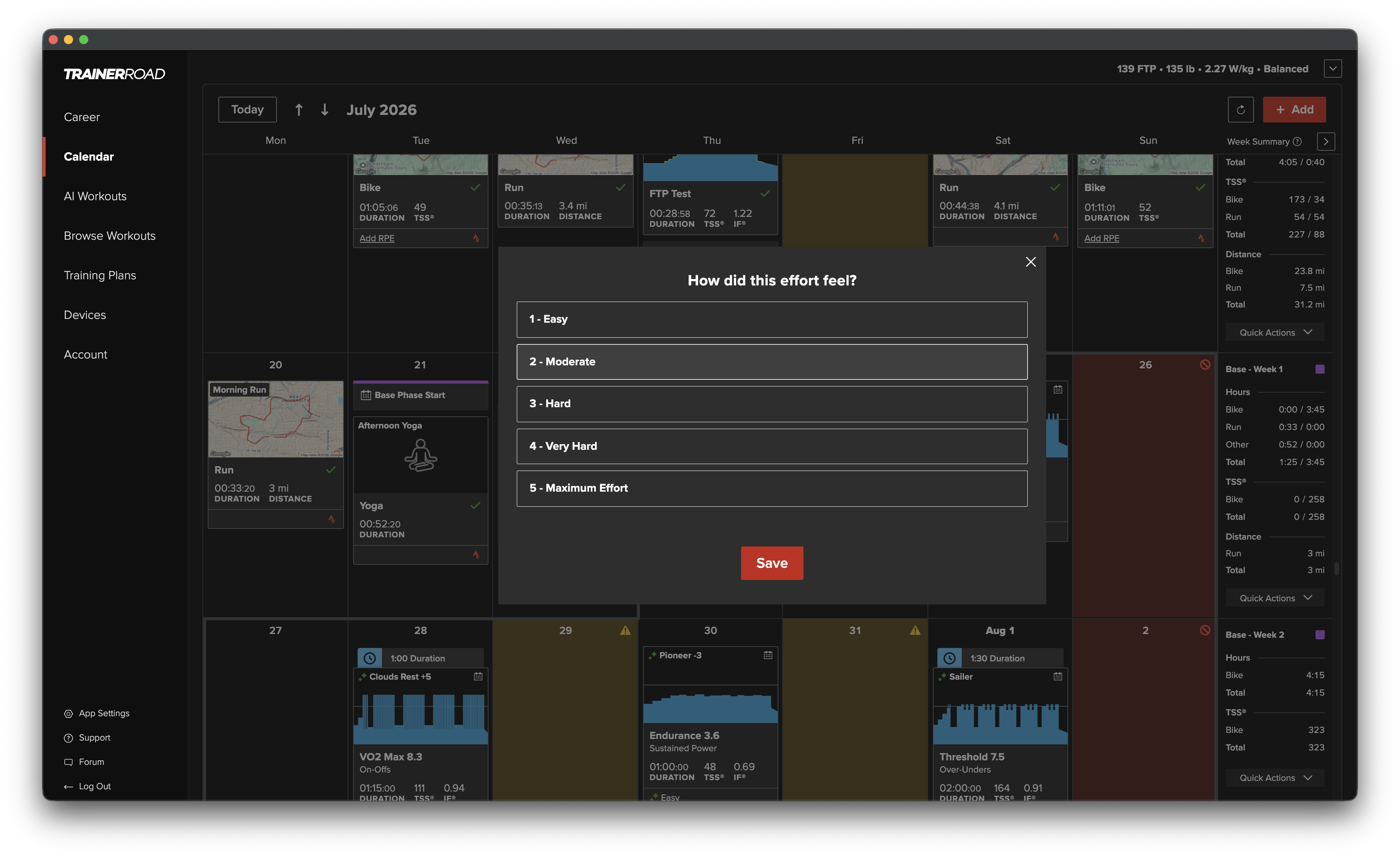
Step One: Find the workout on the Calendar that you would like to add or change the RPE of. Tap the rating (or the missing-response prompt) in the workout details.
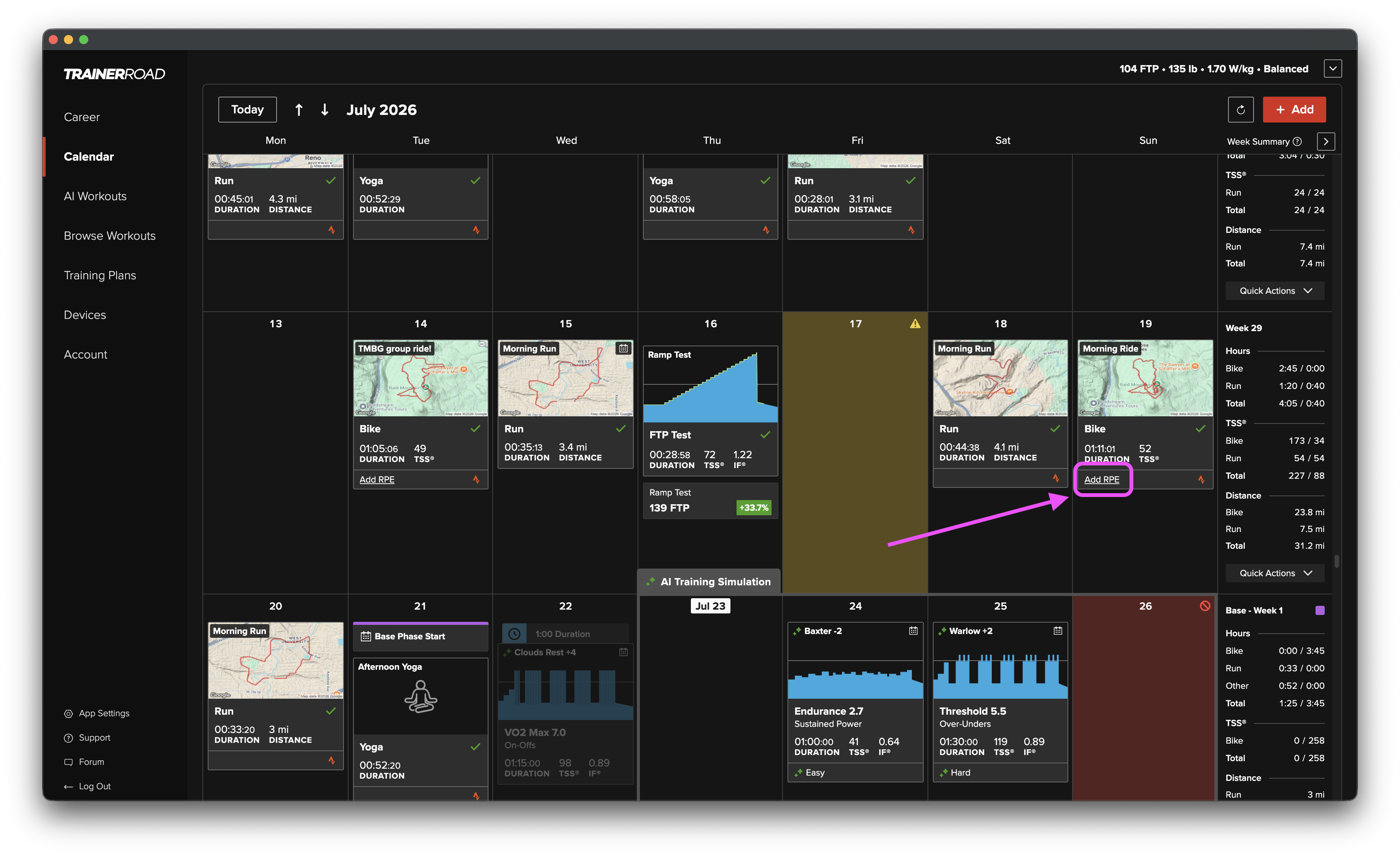
Step Two: Select or change the RPE survey and hit Save
If you receive a survey reminder email, you can also respond directly from the email by clicking the option that matches how the workout felt.
Post-Workout Survey FAQs
How should I respond to the survey if my effort varied over the course of the workout?
Rate the ride as a whole. Even the hardest TrainerRoad workouts include rest intervals, and the end of an interval set will usually feel harder than the beginning of the set. This is all normal. The same workout might also feel different on different days depending on how you fueled or how stressful your day was. More important than what's typical or expected is how the ride actually felt to you.
How do surveys help me get faster?
Your responses give TrainerRoad AI context that ride data alone can't. If you're under or overshooting power targets, we look at the objective power data when analyzing your ride, but your survey tells us how that effort felt, which helps us tell the difference between a bad day, a hard-but-productive day, and a fitness change. That context feeds your upcoming workout recommendations and AI FTP Detection, and it helps keep your training appropriate for your abilities when fatigue starts to build.
How important are surveys for my training?
The more surveys you complete, the better TrainerRoad AI understands you as an individual, and the more personalized your recommendations become. Completing them consistently and honestly is important. You'll also build a subjective record of your training you can learn from later.
Why do I occasionally see different questions on my surveys?
Surveys adapt to how the workout went. If everything went to plan, you'll just get the rating question. If you lowered the intensity enough, skipped intervals, ended the workout early, or rated the effort as a maximum effort, you'll get a follow-up asking why. You may also see a follow-up when a ride was expected to be easy but you rated it hard. TrainerRoad AI just wants to know why a ride of that type was difficult. Either way, rate it how it felt.
What do I do if my survey says I struggled with the workout, even though I wasn't really struggling?
Select "I didn't struggle with this workout." Sometimes life happens, a phone call, a stretch break, a dropped sensor, and it can make a workout look harder than it really felt. The survey exists to clear that up. If you really did struggle, it's important to be honest about that, too. No judgment here, our only goal is to help you get faster.
Will the system get confused if I take a break to stretch, fill bottles, or answer the phone?
TrainerRoad AI makes allowances for short breaks between sets. If you pause during work intervals, it may read the workout as more of a challenge than you meant it to be and if it concludes you struggled when you didn't, you can override that on the survey by selecting "I didn't struggle with this workout."
What if I don't have time to complete the survey?
The surveys are designed to take no more than a few seconds, but if you miss one, don't worry, you can go back and complete it up to 7 days after the workout (see "How to Add or Change an RPE Response" above).
What if I don't want to complete a survey?
We highly recommend completing surveys so TrainerRoad AI can tailor your training.
I tried to complete a missed survey but can't. What happened?
You have up to 7 days after completing a workout to complete or edit its survey. We limit this window so your recollection of the effort is still fresh. That helps keep the data associated with your training trustworthy. If it's been less than 7 days and you still can't respond, shoot us an email at [email protected] and we'll investigate ASAP.
When do I select "Other" as a reason?
Select "Other" when you struggled or ended a workout early for a reason that isn't in the list. You can type a short note describing what happened, and it's saved with your workout.
Why did I get a survey for an unstructured, outside ride?
Every ride counts. Your RPE responses on unstructured outside rides are an important part of how TrainerRoad AI analyzes your fitness. Especially if outside rides make up a big share of your riding.
If I complete an Outside Workout, where do I complete the survey?
Sync the ride from your head unit. Then open the activity on the TrainerRoad website or in the app and add your response from the workout details (see "How to Add or Change an RPE Response" above).
Should I get a Post-Workout Survey for my Ramp Test?
No. This is because the Ramp Test is an all-out effort.